Most articles on PIM workflows describe what a workflow is and what benefits it brings. That is rarely the question causing trouble in a selection or implementation project. The hard questions are these: which processes belong in the PIM at all and which stay outside? Who specifically approves, and what happens when that person is on holiday? How do you notice your workflow is too slow? And where may artificial intelligence take part in decisions, and where not? This article answers exactly those questions. Workflows only pay off on top of a working PIM, and they are one of the most direct levers on data quality in the enterprise.
What is workflow management in PIM?
Workflow management in PIM controls the order in which, by whom and under what conditions product data is enriched, reviewed, approved and published. The decisive difference from a task list is that the system enforces the process: a product only changes status when the defined conditions are met, and every status change is logged.
What is the difference between a workflow and a process?
The process is the business sequence, regardless of whether it is represented in a system. The workflow is the technical implementation of that sequence, with defined steps, responsibilities, conditions and transitions. The distinction sounds academic but has a very practical consequence: a workflow built on a process nobody has thought through makes the existing muddle faster and documents it as well.
Seven terms that regularly get muddled
In projects this confusion costs more time than any technical question. The clean separation:
| Term | What it is | Who owns it |
|---|---|---|
| Process | The business sequence, independent of any system | Business function |
| Workflow | The technical representation of the sequence in the system | Data steward together with IT |
| Workflow engine | The software component executing the workflow at runtime | IT |
| BPMN | A notation for modelling processes, not the execution itself | Process owners |
| Task list (task management) | The interface where users see their open tasks | End users |
| Validation rule | Checks a value for completeness, format or plausibility, independent of the process step | Data steward |
| Permission | Decides who may do something, not when it happens | Administration and data governance |
The most consequential confusion is between workflow and permissions. The two interlock but are separate mechanisms: permissions decide who may act, the workflow decides when and in what order. Changing rights while a workflow is running produces errors that are hard to trace. The overarching bracket is data governance, which sets ownership, standards and rules. The workflow enforces them at runtime.
Which processes belong in the PIM and which do not?
This is the question that makes most projects too broad. A PIM is tempting as a process platform because it already knows all the product data. That is exactly how workflows arise that belong somewhere else and that nobody maintains afterwards.
A workable decision rule: does the process govern an attribute value for which the PIM is the leading system? Then it belongs in the PIM. Otherwise it belongs in whichever system leads for that data, and the PIM only consumes the status change.
| Process | Belongs in | What the PIM needs from it |
|---|---|---|
| Enrichment of marketing and attribute data | PIM | The core case |
| Translation and language approval | PIM | The second core case, often split by language and channel |
| Quality checks and completeness per channel | PIM | Core case, usually validation plus an approval stage |
| Channel approval and publication | PIM | Core case |
| Product and material master creation, price and terms approval | ERP | Only the approved state and the status change |
| Engineering change, bill-of-materials release | PLM | Only the approved technical state |
| Image rights, motif approval, usage period | DAM | Only whether an asset is usable |
| Campaign and editorial planning | Project or campaign tool | Dates as triggers, not as a workflow of their own |
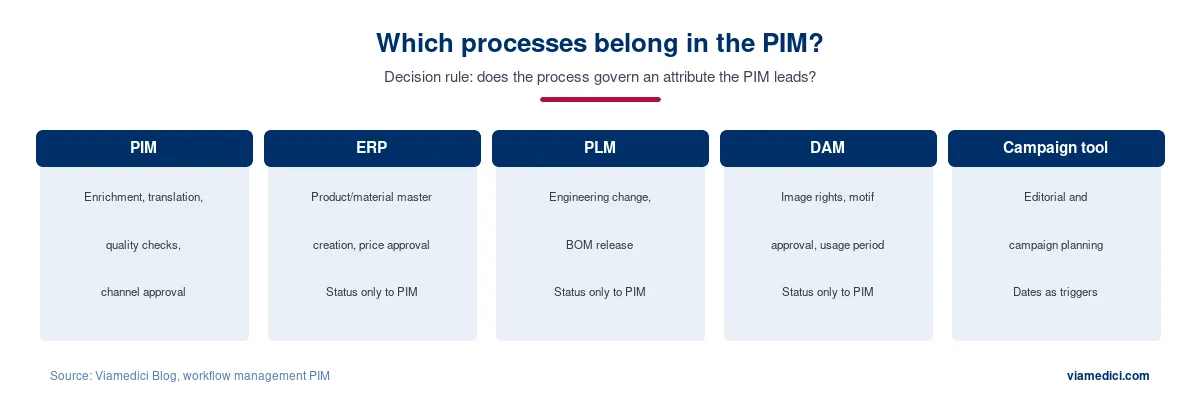
The practical value of this table shows up with the first change request. If price approval was rebuilt inside the PIM, every change to the pricing logic has to be maintained in two places. If only the status is synchronised, the logic stays where it belongs.
Roles and responsibility: who actually approves?
Most workflow descriptions speak of role-based permissions and leave it there. For an implementation that is too vague. Four roles should stay separate:
| Role | Accountable for | Typical mistake |
|---|---|---|
| Data owner | Business accountability for a data object or product group, decides in case of conflict | Never named, so nobody decides |
| Data steward | Structure, attributes, rules, quality and the workflow definition itself | Confused with the administrator |
| Subject approver | Reviews the specific content, for example engineering, marketing or translation | Reviews everything rather than only what is relevant, turning approval into a bottleneck |
| Compliance or regulatory affairs | Liability-relevant information, certificates, safety instructions | Brought in only shortly before publication |
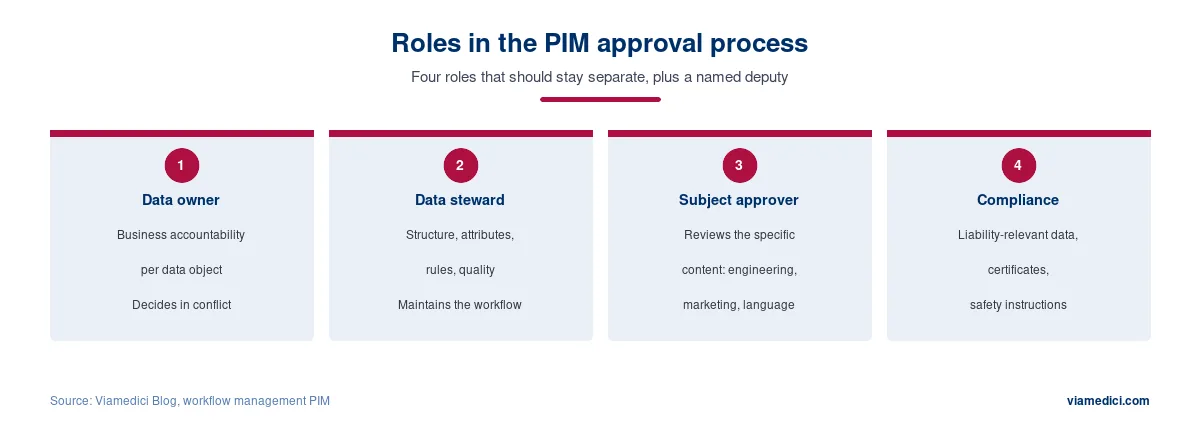
The role most often missing is the data steward. Without it there is nobody to develop the workflow further after the project, and that is exactly where well-built processes go stale.
When is four-eyes review worth it?
Not everywhere. An additional approval stage costs cycle time and attention, and both are scarce. It makes sense for information with legal effect, for safety-relevant data, for prices and for anything that can only be corrected with effort after publication. For descriptive text on a single channel it is usually superfluous. A rule of thumb that holds up: if nobody can say what the second person is supposed to check, the stage is unnecessary.
Escalation and deputies: the most frequently overlooked point
Almost every workflow documentation omits what happens when nobody responds. Three decisions belong in every process definition before it goes live:
- A deadline per step. Without a deadline there is no waiting-time measurement and no escalation.
- An escalation target. Who receives the task once the deadline passes, and is it reassigned or merely reported? Either is defensible, but it has to be decided.
- A deputy arrangement. For every approving role a named deputy, stored in the system rather than set up by an administrator when the need arises.
The last point is delicate because some systems do not allow running workflows to be adjusted easily. A deputy who is only set up once someone goes on holiday means an administrative intervention in the middle of a live process, and those regularly go wrong.
Not only initial creation: the recurring processes
Almost all market articles describe the new-product process. Across a product lifecycle, though, that is the rarest case. Four workflow types are worth distinguishing:
- New product introduction. The full run from creation through enrichment and review to publication. The most involved but least frequent case.
- Change to an existing product. New certificates, updated images, corrected or added attribute values, changed channel assignment. The most frequent case, and the one where a full approval run is usually disproportionate. Price changes, by contrast, belong in the system that leads for pricing, typically the ERP; the PIM only consumes the approved state.
- Regulatory-driven rework. New evidence obligations create mass changes across many products, for instance in the context of the digital product passport. This needs its own process, one that does not push every change through full approval individually. How far sample-based checking suffices depends on the rule set, the attribute affected and the exposure involved: for a mechanically derivable value a sample is often enough, for a liability-relevant record it is not.
- Phase-out and discontinuation. Almost always forgotten, even though successor relationships and spare parts commitments have to be maintained precisely here.
A practical modelling note: scale approval depth to the size of the change. A corrected typo in a description does not need the same path as an amended safety instruction.
BPMN 2.0: what the standard delivers and where it stands in the PIM market
BPMN stands for Business Process Model and Notation and is a graphical notation with an associated metamodel for modelling business processes. It is issued by the Object Management Group. The current version is BPMN 2.0.2, dating from January 2014; there has been no new formal version since (OMG). BPMN is additionally standardised as ISO/IEC 19510:2013, although the ISO version corresponds to OMG version 2.0.1 rather than the current 2.0.2. The difference is editorial: 2.0.2 is a maintenance release containing corrections, and for modelling purposes the two are interchangeable. The distinction only matters when a tender specifies a particular version.
For market reality one observation matters more than the specification itself: BPMN is the exception in the PIM space, not the rule. Most PIM vendors use proprietary state or step models. Pimcore, for instance, builds its workflow engine on the Symfony Workflow Component and models states and transitions; BPMN does not appear in its product documentation. Akeneo uses its own step-based model and documents chained workflows that can run sequentially or in parallel, without using BPMN notation for it. Market claims that attribute BPMN conformance to individual vendors often do not survive a check against the vendor documentation.
The practical difference for decision-makers: a proprietary model ties the process logic to the vendor. A BPMN model uses the same language as the rest of the process landscape and connects to existing process orchestration environments. One caveat belongs with that, and the market tends to skip it: BPMN is vendor-neutral as a notation, but a model is not therefore automatically executable or portable without effort. Forms, connectors, expression languages and vendor-specific extensions remain migration-relevant. What is portable is the process logic, not the complete implementation. At Viamedici, product data maintenance can be driven either automatically or manually via BPMN or workflows in our PIM system, including as a hybrid process combining automated and manual steps.
It is worth staying honest nonetheless: BPMN alone solves no process problem. It is a notation, not a process improvement. Model a poorly considered approval process in BPMN and you have a poorly considered approval process in BPMN.
AI in the approval process: smart routing and attribute suggestions
The value of AI in workflows lies in pre-sorting, not in deciding. Four applications are realistic today:
- Routing based on a classification. The system recognises product group or change type and sends the task to the responsible team instead of into a shared queue.
- Attribute suggestions with a confidence value. Missing attribute values are proposed from existing sources, together with an indication of how certain the suggestion is.
- Completeness checks per target channel, before a task reaches a human at all.
- Outlier detection. Values deviating markedly from comparable products are flagged rather than waved through.
Three things make this workable: logging of source, confidence and change; a defined threshold below which approval is automatic; and the ability to reject any suggestion without restarting the process. Which AI functions in PIM are sensibly automatable today, and which controls belong with them, is covered in our article on AI in PIM.
Where should human approval be provided for?
For all information with legal or safety relevance: safety instructions, approvals and certificates, compliance data, prices and terms, and any value that becomes contractually binding. Whether human approval is legally required depends on the applicable rules and the industry and belongs clarified with the relevant function. From a risk perspective it is advisable here in any case. The implementation then matters: for these attributes automatic approval should be excluded by the system rather than merely stated in a policy. A rule you can bypass by accident is not a control.
One run through the example: product creation with roles, gateway and escalation
To show how the pieces fit together, here is a complete run for a new product. The figures are deliberately a configuration example, not a benchmark.
| Step | Who | Deadline | Condition to move on | What happens on timeout or rejection |
|---|---|---|---|---|
| 1. Creation | System trigger from the ERP | none | Material number and product group present | Without a product group there is no start; the record stays in the inbox |
| 2. Base enrichment | Product management (data owner for the product group) | 5 working days | Mandatory attributes for the product group complete | After the deadline a reminder to the assignee, after 7 days escalation to the data owner |
| 3. Gateway: classification | automatic | immediate | Checks whether the product falls into a regulated class | If yes, branch 4b is added, otherwise straight to 5 |
| 4a. Copy enrichment | Marketing | 5 working days | Descriptive texts present per target channel | Rejected back to step 2 if attributes are missing |
| 4b. Compliance review (regulated classes only) | Regulatory affairs | 5 working days | Certificates and safety instructions reviewed and linked | Rejection with a mandatory comment, the product stays blocked |
| 5. Translation | Translation provider (external, field-level access) | 10 working days | Target languages complete | After the deadline, escalation to the editorial lead |
| 6. Quality check | Data steward | 2 working days | Validation rules green, completeness per channel reached | Rejected back to the step that caused it, not back to the start |
| 7. Channel approval | Subject approver per channel | 3 working days | Four-eyes review only for regulated classes | Without approval there is no publication; the product stays in reviewed status |
| 8. Publication | automatic | immediate | All channel approvals present | Failed channels are retried individually, not the whole workflow |
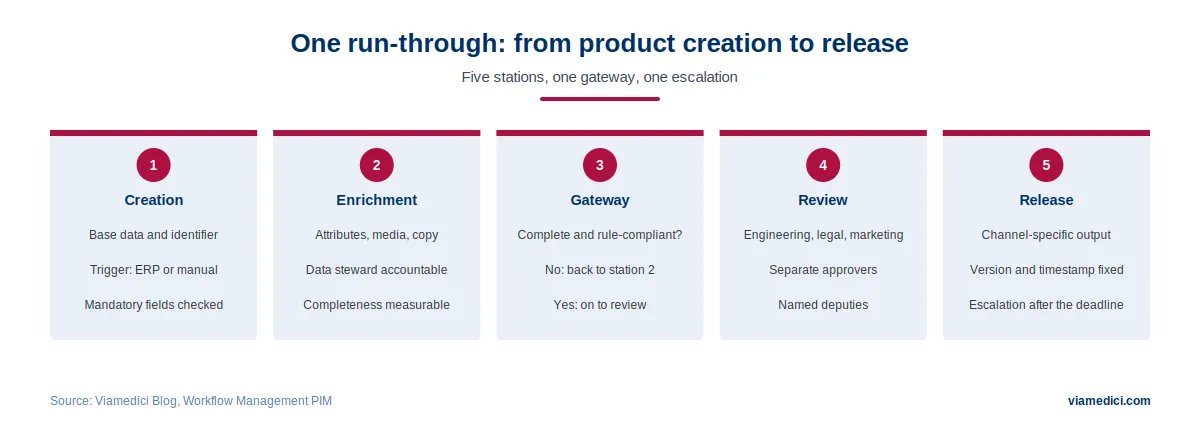
Three details decide whether such a run works in practice. First, the rejection in step 6 goes back to the step that caused the issue rather than to the start, otherwise every correction becomes a restart. Second, four-eyes review is tied to the classification instead of applied across the board, so standard cases are not slowed down. Third, every role with a deadline has a stored deputy, and escalation goes to the data owner rather than to IT.
The measurement points follow from this run by themselves: the waiting time between steps 5 and 6 shows whether the translation provider is the bottleneck, and the rejection rate in step 6 shows whether quality is being checked too late.
Metrics: how to tell where it is stuck
Researching this article turned up no robust, linkable study that methodically measures cycle times in product data approvals. The figures circulating in the market come consistently from vendor communication without sample size or collection period. Rather than borrowing a number, building your own measurement model is the more honest and more useful route.
| Metric | Calculation | What it tells you |
|---|---|---|
| Cycle time per product | Time from creation to publication, split by workflow type | The headline figure. Only meaningful split between new products and changes. |
| Waiting time to processing time ratio | Sum of waiting times divided by sum of active processing times | The most telling metric. A high value means the problem is not the work but the waiting. |
| Rework rate per approval stage | Share of tasks rejected from a stage | Shows where quality is checked too late. High values late in the process are expensive. |
| Deadline adherence | Share of tasks handled within the defined deadline | Only measurable if deadlines are defined at all. |
| Share of automatically approved changes | Automatically approved changes divided by all changes | Shows whether automation actually bites or is merely configured. |
| Bottleneck per period | The step with the longest average waiting time | The one metric from which an action follows immediately. |
Collect these values once before optimising. Without a baseline, any later improvement is an assertion.
Why workflow projects fail
- The as-is process is replicated rather than rethought first. A digitised detour is still a detour.
- Too many approval stages. Any stage whose review purpose cannot be described in one sentence should be removed.
- Only the standard case is modelled. Exceptions, rejections, cancellations and special cases surface in operation and get solved by email, which bypasses the workflow entirely.
- Nobody is accountable for the workflow definition. After the project the process is frozen because it is unclear who may change it.
- Missing deputy arrangement, as above.
- Workflow as a substitute for an unclean data model. If attributes are not standardised, no process can compensate.
Know the system limits before you model
A practical note for selection: workflow functions have limits in every system, and those limits are rarely documented prominently. Typical restrictions that force rework in projects concern the maximum number of steps per workflow and workflows overall, whether more than one group can be responsible per step, whether parallel paths are possible, how long the workflow log is retained, and whether running workflows can be modified or deactivated after the fact.
The last point has the greatest consequences. If an active workflow cannot be adjusted, every process change becomes a migration exercise. Ask about this specifically during selection and have it demonstrated rather than taking it from a feature list.
Conclusion
Workflow management in PIM is less a technology question than a question of accountability. The three decisions that make the difference all fall before the first configuration: which processes belong in the PIM and which stay in the leading system? Who approves, and who deputises for them? And how do we measure whether it works? The technology behind it is manageable, whether with BPMN or a proprietary model. What it cannot replace is a data model that holds up and a named accountability that stays. How a PIM system creates that foundation is described in our article on the capabilities of enterprise PIM software.