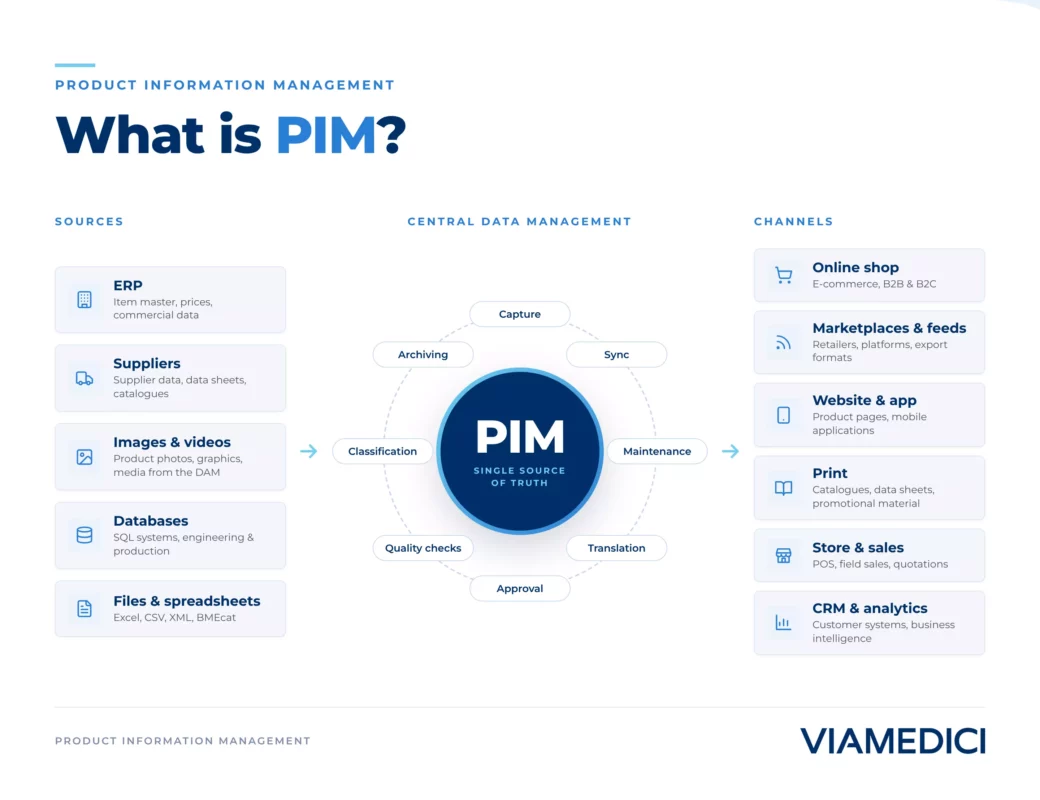
A PIM system (Product Information Management) brings all of a company’s product data together in one place and distributes it, in the right structure, to online shops, catalogs, marketplaces, and trading partners. For manufacturers and distributors with several thousand SKUs, that is not a nice-to-have. It is what makes it possible for product information to stay correct, complete, and current on every channel.
The Essentials in Brief
A PIM system collects technical data, marketing copy, images, and documents from multiple sources, enriches them, and exports them in a channel-ready format. Unlike an ERP system, which holds product data mainly because accounting and logistics need it, a PIM system is built for go-to-market: multilingual by design, with approval workflows and variants for different audiences.
Why Spreadsheets and ERP Systems Fall Short
In many companies, product data management starts in spreadsheets that get emailed back and forth between product management, marketing, and sales. That works reasonably well at 200 SKUs. At 20,000 SKUs across eight languages and a dozen sales channels, the model breaks down: duplicates appear, translations go stale unnoticed, and nobody can say with confidence which version is current.
An ERP system does not solve this, because it was never built to. It manages item master data for procurement, warehousing, and accounting, usually in one language and without marketing content. A PIM system pulls in that base data through an interface and adds everything that matters for sales and communication: descriptive copy, imagery, technical attributes, cross-sell and up-sell relationships.
Not every company needs a dedicated PIM system right away. With a stable range of a few hundred products, a single sales channel, and one language, a well-maintained ERP connection is often enough. The switch usually pays off once a company reaches several thousand SKUs, multiple languages, or the point where marketplaces such as Amazon Business demand their own data formats.
How Does a PIM System Work?
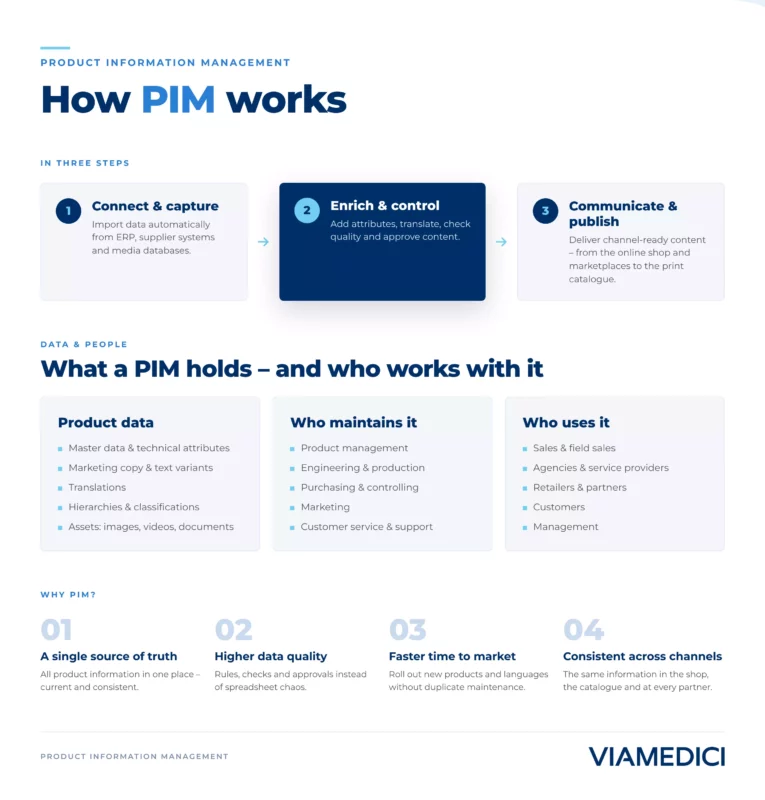
The data flow typically runs in three steps. First, the system imports raw data from ERP, supplier portals, or spreadsheet uploads. Departments then enrich that data: product management adds technical attributes, marketing writes sales copy, and quality assurance checks completeness through rule sets and mandatory fields. Finally, the data is exported in channel-specific formats, such as BMEcat for B2B procurement, a feed for price comparison portals, or a direct connection to the online shop.
Role and approval concepts make sure not everyone can change everything. A data steward, for example, signs off on new attribute values before they go live. How that role works in practice is covered in Data Steward: Role, Responsibilities, and Skills. Which approval steps belong in the system at all is the subject of workflow management in PIM. Where product variety comes from and what it costs is covered in managing product variants.
For day-to-day operations, one thing matters most: a PIM system is not a one-off project but a tool used daily. New products arrive, existing ones get seasonal updates, attributes change with new standards. Companies that populate the system once at launch and then leave it alone lose data quality again within a few months.
What Data Does a PIM System Manage?
Core data includes item numbers, technical attributes such as dimensions, weight, and materials, pricing, and classifications under the eCl@ss standard or UNSPSC. Extended data adds marketing copy, product images and 360-degree views, certificates, safety data sheets, and assembly instructions. In regulated industries, sustainability data for the Digital Product Passport is increasingly part of that scope too, as covered in PPWR: What the EU Packaging Regulation Means for PIM. Much of that data never originates in-house, which is what a structured supplier portal for product data is built for. In construction and plant engineering the same attributes also feed BIM models for building products.
Selection Criteria and Cost
Software licensing cost alone says little about the actual effort involved. Where the data is allowed to live is part of that shortlist too, which is a question of data control when selecting PIM. It helps more to look at three cost blocks: license or cloud subscription, implementation including data migration, and ongoing maintenance by at least one part-time role inside the company. For mid-sized manufacturers with several thousand SKUs, implementation effort alone often runs to several person-months, depending on how clean the source data already is. Which functions actually belong on the shortlist is set out in seven capabilities of enterprise PIM.
| Criterion | What matters | Common pitfall |
|---|---|---|
| Data model | Freely configurable attributes per product category, no custom code | Rigid standard fields that must be worked around for the industry at hand |
| Integration | Pre-built connectors to ERP, shop, and marketplaces | Every connection turns into a custom project |
| Workflows | Approval processes and role rights available out of the box | Approvals keep happening over email regardless |
| Multilingual support | Translation status visible per language, connection to translation services | Language versions go stale unnoticed |
| Scalability | System grows with SKU count and channel count | Performance issues only surface after go-live |
What does a PIM system cost?
Pricing ranges from a few hundred euros a month for small cloud solutions to six-figure annual budgets for enterprise platforms with extensive customization. The license fee matters less than the total cost over three to five years, including migration, training, and ongoing upkeep.
AI in PIM
Modern PIM systems increasingly apply AI to specific tasks, such as automated translation, extracting technical attributes from supplier documents, or classifying new products. That does not replace approval workflows, but it noticeably shortens raw data capture. Which use cases are production-ready today, and where human review still stays essential, is covered in AI in PIM: Use Cases and Limitations.
Common Pitfalls During Implementation
The most frequent source of trouble is not the software but data quality at the start of the project. Migrating uncleaned spreadsheet data into the new system unchanged just moves the mess. Change management effort is just as commonly underestimated: when product management, marketing, and sales have to work by the same rules for the first time, that takes time and clear ownership. A third pitfall is timeline expectations. A basic rollout on a single channel is achievable within a few months; a full multichannel setup with translation workflows reliably takes longer than the first project plan assumes.
PIM Alongside ERP, MDM, DAM, and PXM
PIM rarely stands alone. Where quotes and prices are built from that data, configuration, pricing and quoting sits next to it. Companies that also need to keep customer, supplier, and location data consistent, not just product data, typically add an MDM system, as explained in PIM vs. MDM: Key Differences Explained. Images, videos, and documents usually live in a separate Digital Asset Management system, connected to the PIM through interfaces. And where the goal is a consistent customer experience across every touchpoint, Product Experience Management extends the functional core of PIM.
Practical Example: A Multi-Variant Manufacturer With Two ERP Systems
A manufacturer with several production sites often ends up maintaining product data in two different ERP systems, for instance after an acquisition. Without a central PIM, duplicate item numbers and conflicting product descriptions between sites are almost inevitable. A PIM system with clear golden-record rules merges both sources, decides which record leads based on defined priorities, and distributes a single consistent version to the web shop and trading partners. How that kind of consolidation works technically is covered in the article on the Golden Record. In practice, the benefit usually shows up first exactly where it used to hurt most: complaints about incorrect technical data in the shop, or a reseller uploading an updated price list only to create two conflicting product descriptions in circulation.