Digital Asset Management (DAM) is the central management of digital media: product images, videos, graphics, CAD files, data sheets and manuals. A DAM system stores these files in one place, describes them with metadata, controls rights and approvals, and delivers each asset in the right format to the shop, catalog, distributors and agencies. For manufacturers, that makes it less a marketing tool than the other half of their product data.
What are digital assets?
A digital asset is any file a company reuses and that therefore has value. For consumer goods, people think of campaign images and logos first. In B2B, the list is longer: cut-out product photos in several views, application images, 3D models and CAD data for planners, dimensional drawings, assembly instructions in twelve languages, declarations of conformity and safety data sheets, which for many product groups will also feed into the Digital Product Passport.
Many of these files are created in engineering, quality assurance or by suppliers rather than in the creative team. That is why shared drives eventually stop working: nobody knows which version is valid, and the same dimensional drawing sits in five places.
How does a DAM system work?
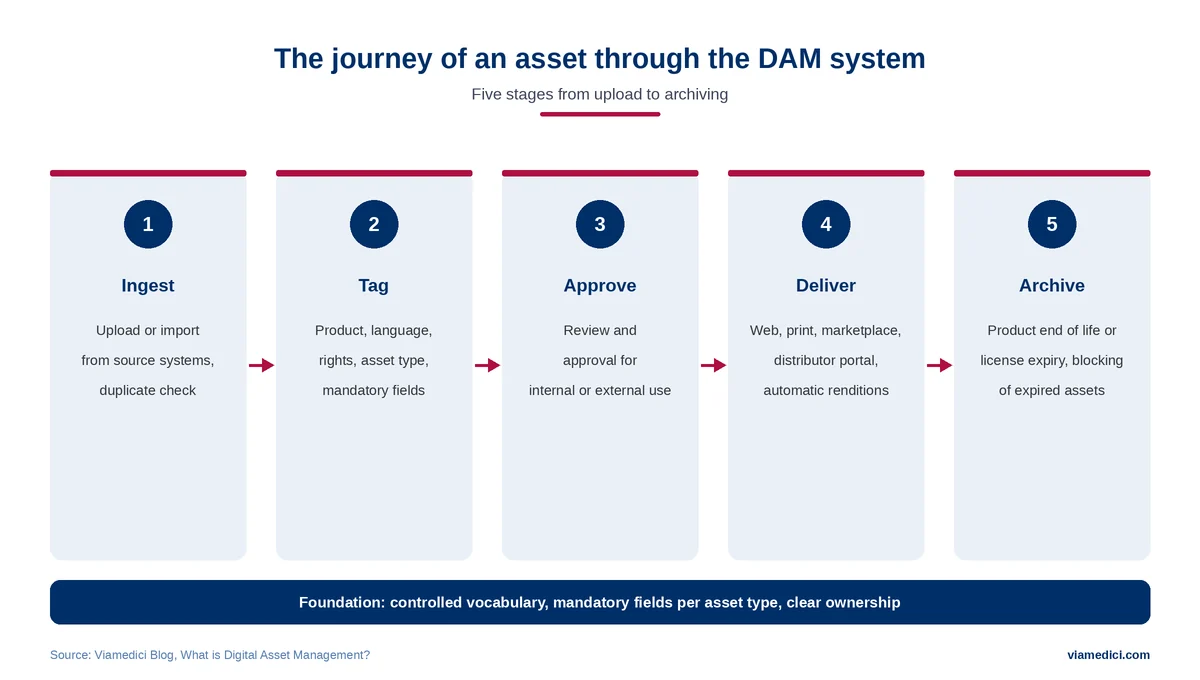
An asset passes through five stages in a DAM. It is uploaded or imported from a source system and checked for duplicates. It is then tagged with product, language, usage rights and asset type. An approval decides whether it may be used externally. On delivery, the system automatically generates the required renditions, such as a web image, a print file or a thumbnail. The final stage is archiving, at the latest when a product is discontinued or a license expires.
What matters is that nobody sends files by email anymore. Distributors, agencies and your own sales team access approved assets through portals, links or direct interfaces. Suppliers upload their images and documents in a structured way instead of dropping them somewhere. The article on the supplier portal shows how this works for product data.
Metadata and taxonomy: the real foundation
A DAM is only as good as its metadata. Without clean tagging, the central archive becomes a central store where you find as little as before.
Established standards exist for image metadata. The IPTC Photo Metadata Standard defines fields for creator, rights and description, and for years has also covered products shown in an image, including the GTIN. Technically, such information is often stored in the XMP format, standardized as ISO 16684-1. The advantage of embedded metadata: it travels with the file, even after it leaves the DAM.
In practice, discipline matters more than the standard. What works is a controlled vocabulary instead of free keywords, mandatory fields per asset type and clear ownership. A product photo needs different mandatory information than a safety data sheet.
DAM and PIM: which system manages what?
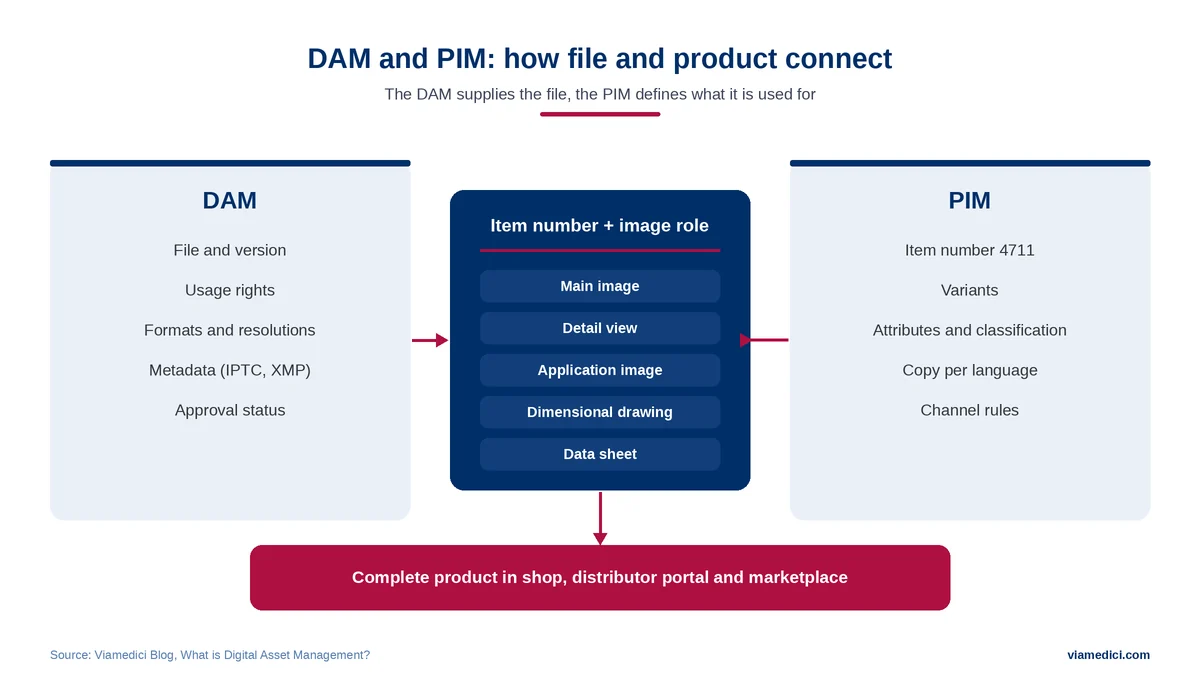
For manufacturers, the most important distinction is the one from PIM. The DAM manages files, the PIM manages structured product information. Only together do they make up the complete product in each channel.
| System | Manages | System of record for | Typical limit |
|---|---|---|---|
| DAM | Images, videos, CAD, documents | File, version, rights, formats | No product attributes, no channel logic for data |
| PIM | Attributes, copy, classifications | Product information per channel and language | Media management usually basic |
| MAM | Video and audio material | Time-based media, editing, playout | Little connection to product data |
| CMS | Website content | Pages, layout, publishing | Uses assets but does not manage them |
| Cloud storage | Folders and files | Storing and sharing | Metadata and rights per channel only with effort |
The link between the two is the item number, whose valid master record many manufacturers keep in Master Data Management. The PIM defines which asset belongs to which item and what role it plays there: main image, detail view, application image, dimensional drawing, data sheet. For variants, the main image is often inherited from the base model, while color variants need their own images. The DAM supplies the file in the right resolution and with valid rights. Some PIM systems include basic media management. As soon as rights, many formats or external partners come into play, a dedicated DAM makes sense.
DAM or MAM?
Media Asset Management (MAM) is sometimes used as a synonym but usually means something more specific: managing video and audio material in media companies and productions, with functions for editing, transcoding and playout. For a manufacturer managing product videos alongside images and documents, a DAM is generally the right system.
Rights, licenses and expiry dates
Rights management is an underestimated part of every DAM. Agency photos come with time-limited usage rights, images showing people need consent, and some images may only be used in certain countries. Gartner explicitly lists the ability to set licensing dates and usage periods for licensed content as a mandatory feature (Gartner Peer Insights, as of November 2025). A good DAM blocks expired assets automatically and shows where they are still in use.
AI in DAM: what it can and cannot do
In a DAM, AI mainly handles the legwork: automatic tagging, background removal, text recognition in documents and finding similar images. With generic images this works well. With specialist subjects, such as a specific valve type or frame size, recognition is often off. Expert review remains necessary there. The article on AI in PIM describes the limits of such methods in more detail.
Labeling is a newer issue. Since 2 August 2026, the transparency obligations under Article 50 of the EU AI Act have applied (European Commission timeline). They mainly require providers of generative AI systems to mark outputs in a machine-readable way. Companies using such systems must, among other things, disclose deepfakes, and realistic AI images of real products can fall into that category. Standard editing such as background removal is exempt. Whether or not an obligation applies, it is worth recording in the DAM which images were created or edited with AI. The IPTC standard provides the Digital Source Type field for this and has recently added fields for the prompt and AI system. C2PA is also an open standard that makes the origin and edits of an image traceable.
When does a DAM system pay off?
A dedicated DAM usually pays off when several of these factors come together: several thousand assets, images and documents in multiple languages, external partners such as agencies or distributors who regularly need material, licensed content with expiry dates, and many output formats for web, print and marketplaces.
There are limits too. A DAM does not create order. It only enforces it. Start without mandatory fields, naming conventions and responsible people, and after a year you have a more expensive shared drive. The most common reasons projects fail are poorly prepared migrations, incomplete metadata and users who keep working in their old folders.
Choosing a DAM system: criteria and cost
Gartner’s mandatory features include a searchable repository with metadata and taxonomy as well as management of licensing data. Manufacturers need to look at additional criteria.
| Criterion | What matters |
|---|---|
| PIM connection | Assets can be assigned to items and variants with image roles |
| Metadata model | Mandatory fields per asset type, controlled vocabulary, IPTC and XMP |
| Formats and output | Automatic renditions for web, print and marketplaces, 3D and CAD |
| Rights | License periods, consent, automatic blocking |
| External users | Portals for distributors, agencies and suppliers with their own permissions |
| Integration | Interfaces to ERP, shop, CMS and marketplaces |
The VIA/DAM product page shows how DAM software with a PIM connection, rights management and partner portals can be structured.
How much does a DAM system cost?
License costs usually depend on the number of users, storage volume and functional scope. Implementation and migration are often the bigger items: reviewing legacy files, removing duplicates and adding missing metadata. Ongoing maintenance by at least one responsible role comes on top. When comparing, look at total cost over several years, not the list price.
How long does implementation take?
The software itself is usually set up quickly. The time goes into preparation: defining the metadata model, reviewing and cleaning legacy files, adding rights and testing the connection to PIM and shop. Starting with a clearly defined set, such as the product images of one brand, gets you productive much sooner than a full migration of every drive.
Is open source an alternative?
Open-source DAM systems are a serious option, especially for smaller teams with their own IT. Many are developed by companies that also sell hosting and support. The key questions are the same as for commercial software: who runs the system, how much effort do the connections to PIM and shop take, and who maintains it three years from now?
How to measure the success of a DAM
Whether a DAM pays off shows in a few values that can be recorded before and after implementation. The most obvious is search time per asset, measured on a sample of typical requests from sales and marketing. More telling for manufacturers is the share of items for which all mandatory images and documents are available per channel. Then there are image requests from distributors that still arrive by email instead of through a portal, and assets with expired licenses that are still in circulation somewhere. Completeness should rise, and the other three values should fall.
Example: a valve and fitting manufacturer and its distributors
Suppose a valve and fitting manufacturer manages around 40,000 images, drawings and manuals on network drives. Specialist distributors ask for current images every week, the agency receives files via download links, and after a product change, outdated dimensional drawings stay in circulation for months.
With a DAM, every asset exists once, linked to the item number in the PIM and tagged with language, role and approval status. Distributors fetch images and data sheets themselves through a portal, expired agency photos are blocked automatically, and a new drawing replaces the old one everywhere. How this content is then prepared for each channel is covered in the article on product experience management. In construction and plant engineering, 3D models also end up in planning software, as the article on PIM and BIM shows.
Conclusion
A DAM system turns scattered files into a reliable asset base that every channel can use in the right format. For manufacturers, its value shows above all in combination with the PIM, because only both together make up the complete product. The first step is therefore a metadata model with clear mandatory fields and owners; the tender comes later.