
A PIM supplier portal is the entry point for product data that is not created in-house. Suppliers, meaning component suppliers or, in distribution, the manufacturers, enter or upload their items, attributes, images and certificates themselves. The portal checks the data against predefined rules at the moment of delivery and only passes it to the PIM after approval. That reduces the rework of spreadsheets, PDF data sheets and email attachments that ties up a lot of time in many companies.
What is a PIM supplier portal?
A supplier portal is a secure web application through which external partners deliver product data directly into the recipient’s data model. It feeds the PIM as an inbound channel. It should not be confused with product and media portals, which publish finished data to distributors, partners and customers. Both are often called “portals”, but they solve opposite tasks.
Two perspectives: manufacturer and distributor
In distribution, the situation is clear. Distributors receive catalogs from dozens or hundreds of manufacturers and have to translate them into a consistent assortment.
The manufacturer’s side gets less attention. Manufacturers also receive data: technical values from component suppliers, material information from raw material suppliers, certificates, safety data sheets and, increasingly, sustainability information from the supply chain. Anyone selling finished products built from purchased assemblies depends on this data to describe their own product completely.
Why email, spreadsheets and PDFs fall short
Every supplier delivers differently. One sends a spreadsheet with its own column names, the next a PDF data sheet, the third an export from its ERP. Someone in the company then transfers the values by hand, chases missing information by email and checks units. That takes time and produces typing errors, and later nobody knows who delivered what and when. This is how dark PIM builds up: product knowledge that exists but never reaches the PIM in structured form.
The bottleneck is rarely the supplier. Often there is simply no clear specification of which data is expected in which form. A portal makes exactly that specification binding.
How supplier onboarding works
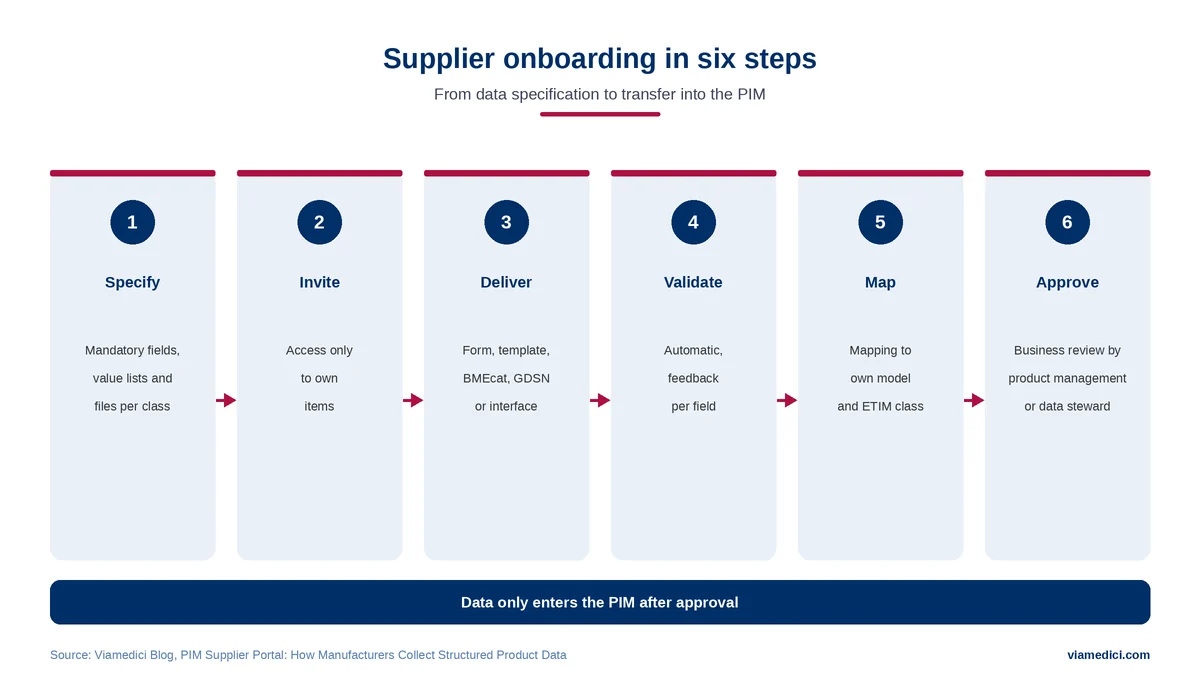
A clean onboarding process has six steps.
The first step is the specification: for each product class, it is defined which attributes are mandatory, which values are allowed and which files must be supplied. In the second step, the supplier is invited and receives access that shows only its own items.
Third, the supplier delivers, depending on size and capabilities, via input form, template file, catalog format or interface. Because templates and forms apply per product class, the class is already set at this point. Fourth, the portal validates automatically and reports back per field what is missing or implausible.
In the fifth step, the validated data is mapped to your own data model, for example when supplier attributes are mapped to your own attributes or an ETIM class. The final step is approving incoming supplier data through product management or a data steward. Only then does the data enter the PIM, where it is enriched and prepared for the channels.
Quality rules that work
The most important rules are unspectacular but effective: mandatory fields per product class, value lists instead of free text, fixed units, plausibility checks such as “weight greater than zero”, and dependencies between fields, for example when an IP rating is only required for electrical products. Images and documents add checks for file format, minimum resolution and mandatory documents such as declarations of conformity. For trade goods, a GTIN check belongs in the list too, so that items can later be assigned unambiguously.
What matters most is how the feedback is worded. A supplier who only reads “delivery rejected” will send the same file next time. A message like “IP rating missing for 14 items”, on the other hand, can be fixed in minutes.
In VIA/Portals, prices, technical specifications, images and attributes are checked against such standards before submission. A threshold function also allows partial submissions for internal review. The PIM then applies a second validation stage for data quality across all sources.
Which format for which supplier?
Not every supplier can produce a catalog in a standard format. Small suppliers need a simple route, large ones prefer automated delivery.
| Delivery route | Suitable for | Note |
|---|---|---|
| Input form in the portal | Small suppliers, few items | Lowest entry barrier |
| Template file (spreadsheet) | Mid-sized suppliers, regular deliveries | Template per product class, validated in the portal |
| BMEcat with ETIM or ECLASS | Large suppliers, complete catalogs | Established B2B standard |
| GS1 GDSN | Consumer goods | Exchange via certified data pools |
| Interface (API) | High frequency, close integration | Highest setup effort |
BMEcat is the established XML format for B2B catalog data, currently in version 2005.2. For classification, many industries use ETIM or ECLASS. According to ECLASS, more than 4,000 companies use the standard, and more and more of them require it from their business partners. Consumer goods manufacturers exchange data via GS1 GDSN, which requires a certified data pool.
What about suppliers without a standard format?
Many smaller suppliers work without a PIM and can neither produce BMEcat catalogs nor classify according to ETIM. For them, a template per product class is the pragmatic route, with fixed columns, drop-down lists for allowed values and a sample item. The portal validates the uploaded file just like an entry in the form. As the collaboration grows, the supplier can later move to a catalog standard.
Supplier record and golden record
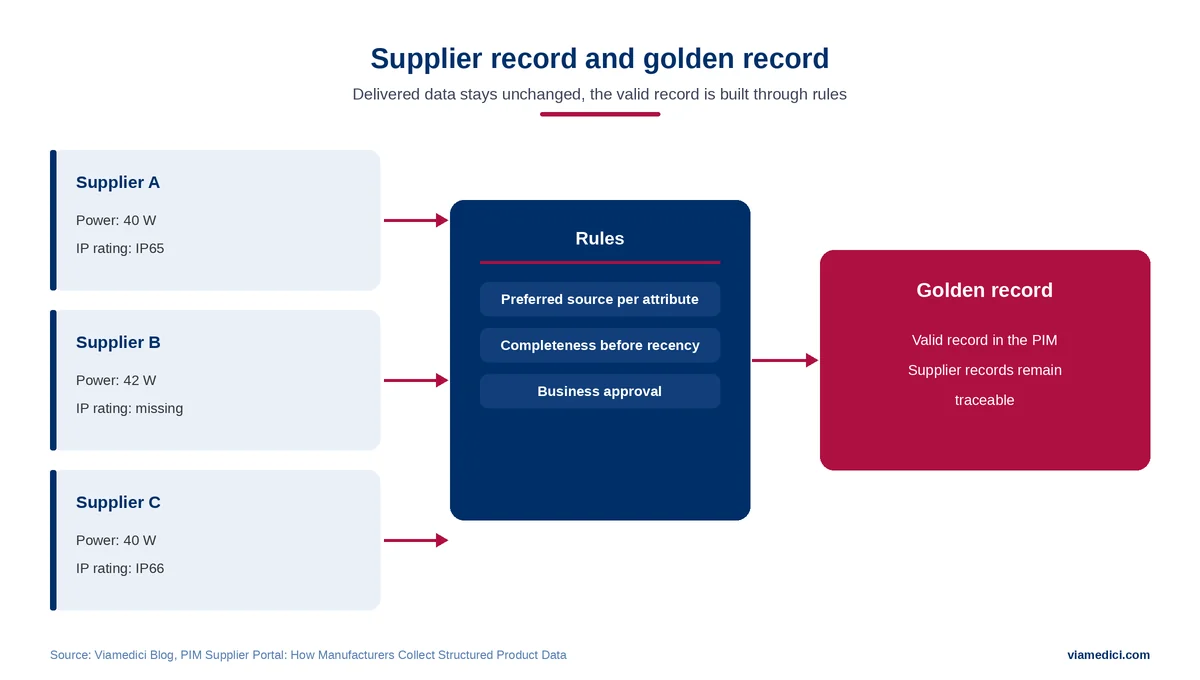
An important design decision is often overlooked. The delivered data should be kept unchanged as the supplier record (source record). Corrections and additions happen in your own product record. This keeps a clear record of what the supplier delivered and what the company did with it.
If a company sources the same item from several suppliers, it needs rules on which value takes precedence. These rules produce the golden record, the valid record built from several sources.
How to bring suppliers on board
A portal is only useful if suppliers use it. The most effective lever is the supplier’s own benefit: fewer follow-up questions, clear feedback on what is missing, and a specification known before the first delivery. Short instructions with sample items and a fixed contact person help as well.
For important suppliers, it is worth including data delivery in framework agreements or supplier evaluations. Without that commitment, the portal remains a voluntary option that loses out to familiar email in everyday work.
Roles and responsibilities
For each product class, it should be clear who maintains the specifications and decides on new mandatory fields. Business approval of incoming data is often handled by a data steward. Suppliers see only their own items in the portal, and every change is logged. Because the portal also holds contact details of individuals, data protection belongs in the planning too.
New mandatory fields should not appear spontaneously. Every additional requirement means effort for all suppliers in a product class. A short change process in which product management, purchasing and e-commerce decide together and inform suppliers in good time has proven effective.
How to measure success
Reliable statements come from your own metrics, measured per supplier and compared with the starting point.
| Metric | What it shows |
|---|---|
| Share of deliveries that pass validation first time | How clear the specifications are |
| Open errors and their age | Where suppliers need support |
| Time from invitation to approval | How quickly new items become available |
| Number of feedback rounds per delivery | Effort in your own team |
| Completeness per target channel after approval | Whether the delivered data is sufficient for selling |
Example: a luminaire manufacturer and its suppliers
Suppose a manufacturer of industrial luminaires sources drivers, housings and optics from a few dozen suppliers. Technical values arrive as PDF data sheets, certificates by email. For every new luminaire, product management copies values by hand and chases missing information several times.
With a supplier portal, the manufacturer defines per component type which values are mandatory, such as power consumption, IP rating and operating temperature. Suppliers enter the values themselves, the portal returns incomplete entries with a specific note, and product management only has to approve. The component data is then available for the luminaire’s data sheet and later for the product passport.
Why the topic is becoming more urgent
With the Digital Product Passport, manufacturers must provide information that often comes from the supply chain. According to the European Commission, economic operators gather the product information required under applicable EU legislation. For certain batteries, the passport becomes mandatory from 18 February 2027, with further product groups to follow. Much of this information, such as materials and origin, often has to come from suppliers.
Limits of a supplier portal
A portal does not replace a data model. If it is unclear which attributes a product class needs, the portal cannot validate anything. With few suppliers and few items, the setup effort often outweighs the benefit. Templates and rules also need maintenance, at the latest when ETIM or ECLASS publish a new release. AI can help map supplier columns, but approval stays with people.
And the outbound side?
Once the data is in the PIM, publishing begins, for example via a product and media portal. Images and documents from the supplier delivery end up in digital asset management. The page on Viamedici portals shows how supplier, media and sales portals work together. Central data management is handled by the PIM system VIA/PIM360°.
Conclusion
A PIM supplier portal moves product data validation to the beginning, where the data is created. It works when specifications are clear, suppliers have a simple route and someone owns the approval. With the Digital Product Passport, this inbound channel is turning from a convenience into a necessity for many manufacturers.